It’s all too easy to get sucked in to checking your Twitter and your Plurk and your Brightkite and your Facebook and whatever other services you use; in my case I can claim I need to know something about how these things work for a project. In theory I’m making useful observations of how people interact with services and what value they get from them, but in reality I spend a bit more time watching and reading than is needed for that. It’s very easy to follow tweeted links and then find myself web-surfing, just like it was in the early days of the web, when we all watched what came up next on NCSA Mosaic’s “What’s New” page. So it’s a little ironic that John tweeted a link that made me more aware of the slippery slope of online distractions, and potential ways to combat them. Thanks, John!
Category: Technology
Twitter Musings
Tim recently posted about Twitter, and it got me thinking I should blog some of my own thoughts on the subject of Twitter (and related services such as Jaiku). Tim’s not the only person to move from tweeting a balanced mix that includes apparently superficial trivia to mainly, or even only, tweeting work or business-related stuff. From my point of view, that’s regrettable. I follow only a few people, mostly people I know in person, because I want to know what they’re up to and maintain some sort of contact with them as people, not because I see them as sources of business information. I’ve watched people’s blogs go from personal-with-some-work to mostly-work, now I’m watching people’s twitter feeds go through the same transformation, and for me there’s a feeling of loss, a feeling that I’m just watching more masks (thinking back to Julie Leung’s talk at Northern Voice) being put in place.
I guess it’s inevitable than any new mode of broadcast communication be coopted in this way. I’ve had the same feeling at NorthernVoice of being a King Canute in seeking to emphasize the personal communications aspect of blogging and social media; the additional problem there of course is that people happy to blog at a personal level apparently see no need to attend a blogging conference.
Many people whose recommendations I would value don’t blog much any more. They put the links to articles they’ve read, or books they liked, in their Twitter feeds. If I’m not reading Twitter at that time, I miss those links. No, I don’t like blogs that are solely link feeds, there does have to be a balance, but if something’s worth recommending, why not recommend it somewhere it might live longer than a couple of hours? And somewhere I have a hope of finding again if I have a mental bookmark that you wrote about something interesting while I was busy doing something else?
Company Websites 101
I’m not in marketing, so I’m not going to pontificate on how companies should design the look and feel of their websites, nor on what they should say on their websites. But there are some really basic things that companies should do to make their websites more usable, at least to a first degree.
Item 1: don’t make your customers tell you where they live until they need to, nor what sort of services they’re interested in. Case study: Rogers, a purveyor of wireless phones and other telecom services. The first screen you see at rogers.com makes you choose between residential and business services. If you click business, it assumes you live in Ontario. If you click residential, you then have to tell it which province you live in. Every time I pay my wireless bill online, I have to go through the same rigmarole. Can’t they figure out some way of giving people the basic information and then letting them choose which subset of the site they want? Telus (another telco) does the same thing, you have to tell them which province you live in before being allowed into the site. Bell Canada (a competitor) does this better. Not perfect, they have this weird dialog box floating in space, but it’s better. The login for people with accounts who want to pay them quickly is right there on the first page, unlike for Telus or Rogers. Maybe they should spend five minutes some time and figure out who uses their sites? Or make their executives try to pay their own phone bills online?
Item 2: assume that some people will be lazy, and not want to type the “www.” all the time. Case study: Shoppers Drug Mart, a Canadian drugstore/pharmacy. If you go to www.shoppersdrugmart.com, you get to the site. If you type shoppersdrugmart.com into your browser, you get “Unable to connect” as the server rejects the connection. This strikes me as bizarre and lazy; it’s not that hard to set up a server to accept both types of address, and user-unfriendly to not do so.
Item 3: if you run a store, setting up a web site, advertising it, and then putting no content on it is a waste of time. If you can’t think of anything else to put on your web site, put your phone number, your location, and your opening hours. A few words about products and/or services you provide wouldn’t hurt either. Case study: too many, and they all make me wonder why they bothered.
More Asus
As intended, I did take the Asus eee pc along on my trip to Maui last month. It was certainly a lot lighter in the backpack than the usual laptop. I even used it a bit (it has a fairly decent sudoku game on it). The wireless connection was a little flaky; I could sometimes nominally connect to some wireless network but no bits would actually flow down the pipes. The error messages were useless, but then there often isn’t a lot to do when the wireless doesn’t work. Eventually I found a network that did let me connect properly, so I could check email and the odd web site.
If I were to use the Asus a lot, I’d need to figure out a few different applications; for a few days while travelling or otherwise not working I can cope with checking feeds through browser-based applications (after all, that’s how many people actually do check feeds, if my log files are to be believed) and funnelling my personal email through GMail, but eventually I’d want something better. Learning the keyboard shortcuts does help, so maybe it would just be a matter of getting used to those less-rich interfaces. Or maybe they’d get more annoying over time?
I’d also want to tweak behaviour (move icons around in the tabbed windows), and add useful extensions. For example, I use the CoLT extension on Firefox to copy the link and text, which is really handy on the small keyboard. And I’d need to learn more usability tips from sites such as the eee user forum, such as the one about moving big dialog boxes around by keeping the Alt key pressed while dragging from inside the window, so you can get to the buttons. I’d probably want to tweak my blog’s stylesheet as well; in fact I’m thinking about how to do that anyway, having seen what it looks like on the small screen.
The Asus may not quite be what Roger’s talking about in his manifesto for the walkaround-web tablet, but it does fill a definite niche.
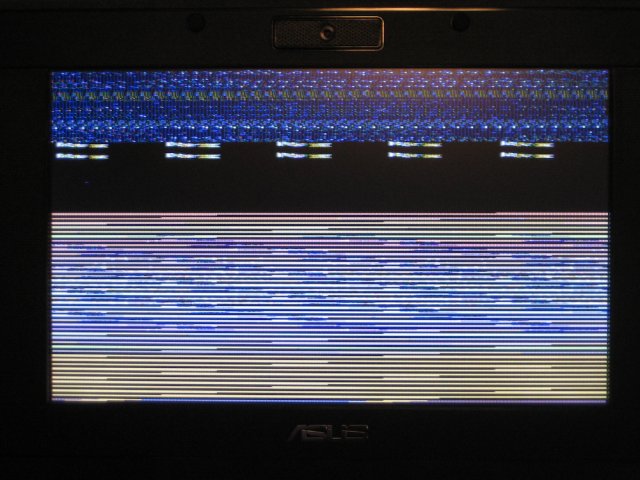
And I haven’t seen too many bugs, although I’ll close with the amusing picture I snapped after leaving it in suspend mode for a while…
Balisage Deadlines
Balisage is this new XML++1 geekfest, put on by some of the people who used to put on the Extreme Markup conference, which is aimed to get the brain cells running again after summer. It’s being held in Montréal in the middle of August, which means all those street-level restaurants, and brushing up on French cuisine (if not the language).
Oh yes, the deadlines…
If you want to speak at Balisage or the Preconference Symposium on Versioning, you need to submit your full paper by April 18th, using the supplied tag set. If you want to attend, advance registration closes on August 1st, so you have time for that. Hotel reservations must be made by July 1st if you want to stay in the conference hotel. The conference should be fun and mind-boggling at the same time, at least if XML-related theoretical musings are your idea of fun.
1: this means XML is one of the subjects discussed there, and most of the others are in some (albeit tortuous) way related to it.
Asus eee: first looks
I got an Asus to take on holiday (vacation) with me, and to play around with. They’re cute and small and way easier to lug around than a laptop. With the small screen doing serious work is more difficult (a plus when you’re not meant to be working) but I can still check email and web sites and maybe even catch up on some blogging.
I got the 4G version, and had the RAM increased to 2 GB in the shop so the warranty is still valid. Just in case. Not to mention which, it cost all of $15 and 5 minutes for them to do it, and it would probably have taken me longer to find the right screwdriver.
First impressions: it’s cute. The “easy desktop” is mostly useful, and the selection of applications reasonable (Firefox, Thunderbird, Skype, Open Office, Pidgin). I’m trying to restrain my inner geek and see how much I can get done with the easy desktop before I revert to type and install the full desktop. Some things don’t change though; one of the first things I did was find where to update software (add/remove panel) and update everything. You get this weird message for some applications, such as Skype, saying that you can remove the package after updating, without saying whether that’s just to clean up the package remains after they’ve been installed, or whether it really does remove the whole thing. Given you can’t remove (most of?) the default software, I’m assuming it would actually uninstall those applications that can be removed; maybe when I have time to do the delete/reinstall cycle I’ll try out that assumption.
I’m not sure how far I can get without installing and configuring some extra stuff. Some of the instructions and scripts the on Absolute Beginners Wiki look useful so I’ll probably break down and try them out. Part of the reason for restraining myself on this is curiosity — what does a Taiwanese company think that “housewives, office ladies and students” need in a mobile internet device? Part is also to figure out whether I can recommend this sort of device to non-technical people I know, or whether I’ll also have to tell them to do X, Y, and Z to make it usable.
More later, after I’ve played with it a bit more.